1.管理画面左側メニューの『ACCESS』→『MAP』をクリック。
「編集」をクリック。
2.infomation画像の『Brouse…』をクリック。
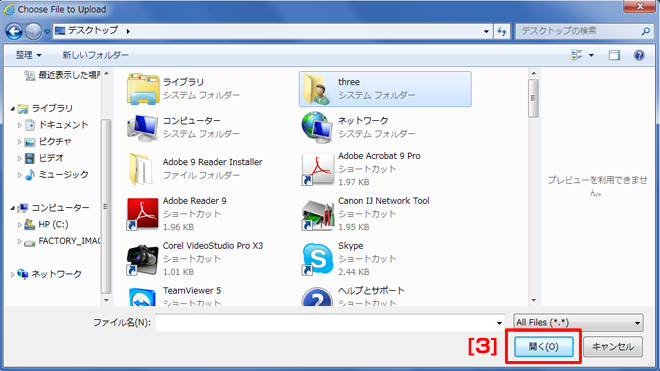
3.任意の画像を選択し、「開く」をクリック。
※画像のサイズは300×210。
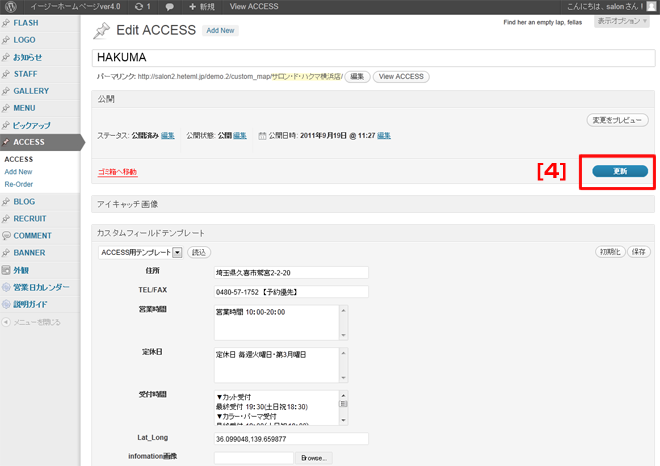
4.「更新」をクリック。
(注) 「更新」をクリックしないと更新した内容がHPに反映されません。

1.管理画面左側メニューの『ACCESS』→『MAP』をクリック。
「編集」をクリック。
2.infomation画像の『Brouse…』をクリック。
3.任意の画像を選択し、「開く」をクリック。
※画像のサイズは300×210。
4.「更新」をクリック。
(注) 「更新」をクリックしないと更新した内容がHPに反映されません。