Warning: Use of undefined constant help - assumed 'help' (this will throw an Error in a future version of PHP) in /home/users/2/hakuma890/web/web890.info/wp-content/themes/ver6.1/single.php on line 1
Google Analyticsの設定 | 格安ホームページ制作 EZ Home page

Google Analyticsの設定

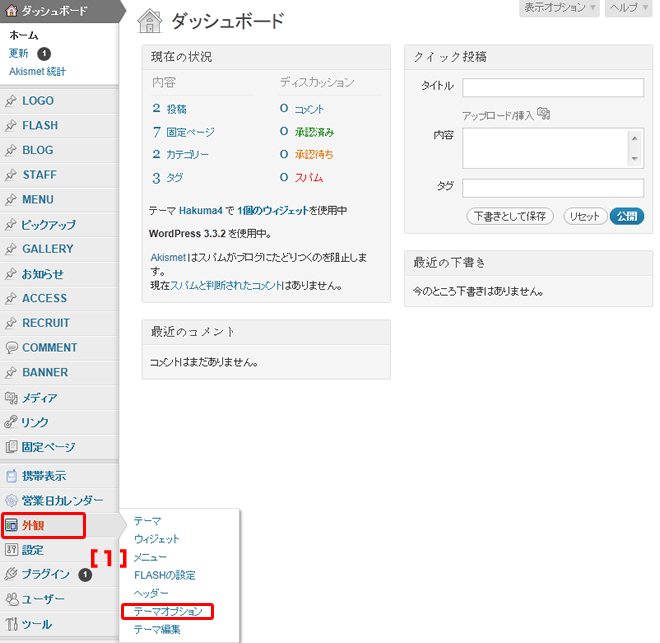
1.管理画面左側メニューの『外観』→『テーマオプション』をクリック。

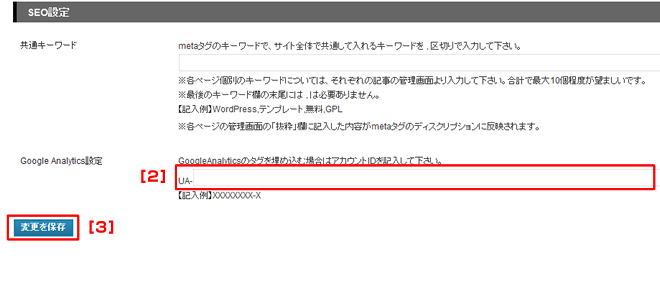
2.『Google Analytic』コードを入力する。
・Google account、Google Analiticsをご自身で設定後、設定ください。

Google Analiticsについては →こちらから

3.『変更を保存』をクリック。
(注) 『変更を保存』をクリックしないと更新した内容がHPに反映されません。

Warning: Use of undefined constant help - assumed 'help' (this will throw an Error in a future version of PHP) in /home/users/2/hakuma890/web/web890.info/wp-content/themes/ver6.1/single.php on line 35